How to mix two songs for the first time: a 15-minute DJ practice plan
A beginner plan for your first DJ transition: choosing two songs, matching tempo, using the crossfader and cutting the bass, with a phone and no gear.
A DJ transition is just one song fading out while another fades in, without the two fighting each other. You can learn your first clean one in a quarter of an hour with a phone. Here is a plan.
Minutes 0 to 3: pick two friendly songs
Choose two songs of the same style with a steady beat, ideally within a few BPM of each other (for example two house or pop tracks around 120 to 128 BPM). Avoid songs with long quiet intros or changing tempo for now. Songs you know well help, because you can hear where the phrases change.
Minutes 3 to 6: match the tempo
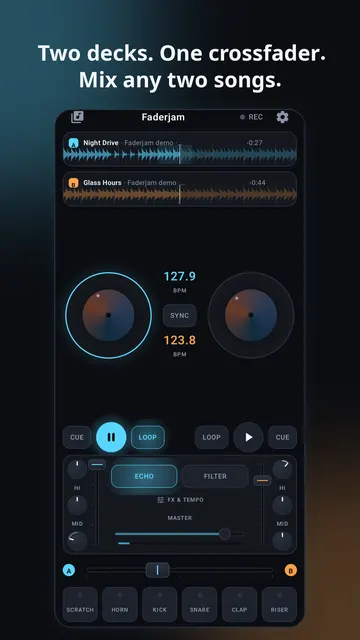
If the tempos are different, the beats drift apart and sound like a horse galloping. Most DJ apps detect the BPM and have a SYNC button that matches one deck to the other. Use it. Learning to match by ear is for later.
Minutes 6 to 10: start the second song on the first beat of a phrase
Pop and dance music is built in blocks of 8, 16 or 32 beats. Start the incoming song exactly when the playing song begins a new block, often where the drums come back or the vocal starts a new line. Count along: one, two, three, four. Set a cue point at the first beat of the new song so you can start it on time.
Minutes 10 to 13: move the crossfader slowly
Bring the crossfader from the first song towards the second over 8 or 16 beats, not in one jump. Slow and even is the whole trick. If both songs have a heavy bass line, turn the bass (low EQ) of the incoming song down at first and swap: bass out on the old song, bass in on the new one, on a phrase change.
Minutes 13 to 15: record and listen back
Record the mix and listen without looking at the screen. You will hear immediately whether the beats lined up and whether the change felt natural. Do it three times with the same two songs before changing songs.
Common first mistakes
- Moving the crossfader too fast, so it sounds like a cut rather than a blend.
- Both bass lines playing at once, which sounds muddy.
- Starting the second song in the middle of a phrase.
Practising on your phone with Faderjam
Faderjam puts two decks and a crossfader on a phone screen, detects BPM automatically, matches tempo with SYNC, and comes with demo tracks so you can try this plan the moment you open it. You can record your mix and play it back.