Recover deleted photos on your phone: check these places first
Where deleted photos and notes go on Android and iPhone, how long each trash keeps them, and what a recovery app can and cannot do once the trash is empty.
Most "lost" photos are not gone. Phones and cloud services keep deleted items in a trash for weeks. Check these places before installing anything, and stop taking new photos and videos until you are done: new files can overwrite the space the old ones used.
1. The phone's trash (fastest)
- Samsung Gallery: Gallery → menu (≡) → Recycle bin. Items stay about 30 days.
- Android 11 and later (most gallery apps): deleted photos go to the system trash for about 30 days.
- iPhone: Photos → Albums → Recently Deleted. Items stay about 30 days.
2. The cloud's trash
- Google Photos: Library → Trash (Bin). Backed-up items stay 60 days; items that were never backed up stay about 30 days on Android 11 and later.
- iCloud Photos: the same Recently Deleted album, also on icloud.com.
- Other backups: Samsung Cloud, OneDrive or a computer you synced with may still have a copy.
3. Deleted notes and memos
- iPhone Notes: Folders → Recently Deleted, up to 30 days.
- Samsung Notes: menu → Recycle bin, about 30 days.
- Google Keep: menu → Deleted, only 7 days.
- Notes saved only on the phone with no account and no trash are very hard to bring back without a backup.
4. When the trash is already empty
Be realistic. Modern phones encrypt storage and quickly clear deleted blocks, so without root no app can read deleted space on an Android phone's internal memory, and on iPhone apps cannot scan the phone at all. What a phone recovery app can still find is copies that are left over: hidden thumbnails, cache folders, files a chat app kept, or a trash another app did not show you. That is often enough to save a few important pictures, sometimes at lower resolution.
Our free RecoverHelper app for Android does exactly that: a quick scan of trash, hidden and cache folders, and a deep scan that also finds image data inside cache files, then restores what it finds into a RecoverHelper folder. It says plainly when something cannot be recovered. For SD cards and memory cards, a computer scan with the RecoverHelper desktop app has a much better chance, because cards are not encrypted like the phone.
5. So it does not happen again
- Turn on photo backup to a cloud or a computer.
- When you clean up, review before you delete, and empty the trash only at the end.
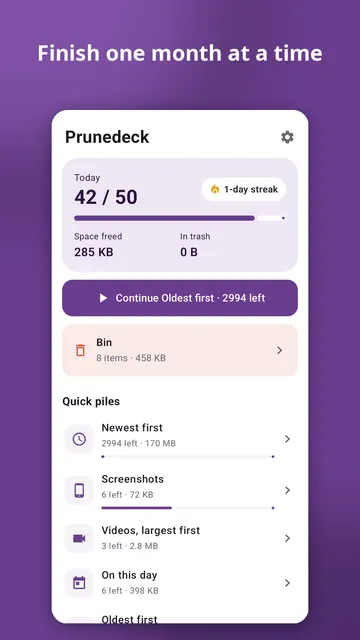
Cleaning the gallery with Prunedeck
Prunedeck shows your photos one at a time: swipe left to toss, right to keep, up to favourite, down to decide later, with unlimited undo. Ready-made piles start with the biggest wins: screenshots, videos largest first, files over 10 MB, oldest first or one month at a time. Similar burst shots appear side by side with the sharpest one suggested. Tossed photos go to a bin you can review, then to the phone's trash, and the app only counts space as freed once it is really gone. It works on your phone with no internet permission, no account and no ads.