AI glasses and tiny earpieces in exams: how to check an exam room
 ▶ Watch: catch exam cheating gadgets with a phone (YouTube)
In 2026 exam boards in Korea, China, the US and Spain started treating smart glasses and hidden earpieces as a real threat. What has been reported, how the devices work, and a practical way for invigilators to check a room.
For decades, exam cheating meant notes up a sleeve or a glance at a neighbour's paper. In 2026 the problem changed shape. Glasses with a built-in camera can photograph a question and send it to an AI service, and the answer can come back through a tiny earpiece, a watch or a hidden phone. Nothing about the candidate looks unusual.
What has been reported in 2026
- South Korea: a nationwide survey of 5,679 middle and high schools found four confirmed cases of AI smart glasses used in school exams; the students received zero in those subjects (UPI). Smart glasses are banned from the national college entrance exam, and officials are using Bluetooth and Wi-Fi scans and metal detectors (Korea JoongAng Daily). A candidate who wore AI glasses in a national technical qualification exam became the first such case to be prosecuted.
- China: before the 2026 gaokao, the Ministry of Education warned that bringing phones, smartwatches or smart glasses into the exam room counts as cheating even if they are never switched on, and some regions asked candidates to take off their glasses for inspection (People's Daily).
- United States: the College Board banned smart glasses during the SAT from March 2026, prescription models included (Android Authority).
- Spain: a candidate in the 2026 MIR medical exam was caught with smart glasses and a smartwatch, and several regions used radio-frequency detectors at the university entrance exam (PAU) to find tiny earpieces and smart glasses (Redacción Médica).
- India: police have repeatedly broken up groups that used in-ear Bluetooth devices in recruitment exams (Kerala Kaumudi).
How the devices work
- AI or smart glasses: a small camera lens near a hinge, sometimes a recording light, and thicker temples that hold the battery. Most pair with a phone over Bluetooth, and the phone does the AI work.
- Tiny earpieces: some sit deep in the ear canal and connect by Bluetooth; others receive sound from a thin loop worn around the neck, and the loop holds the radio. The earpiece itself may emit nothing.
- Hidden cameras: in a button, pen or watch. Cameras that stream need Wi-Fi or Bluetooth; cameras that only record do not.
- A second phone or hotspot: sending a photo to an AI service needs the internet, so there is often a phone hotspot nearby.
How to check a room, step by step
- Before candidates arrive: list the Wi-Fi networks and Bluetooth devices in the empty room. That is your baseline.
- At entry: collect phones, watches and earbuds switched off; look at glasses frames, ears and the neckline; ask for hearing aids to be declared in advance. If your rules allow, offer a plain pair of glasses or ask candidates to put glasses on the desk during the check.
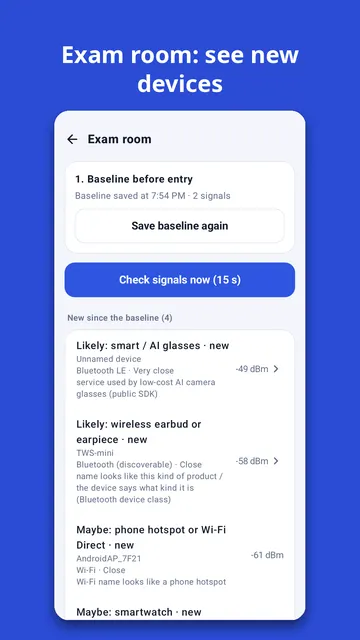
- During the exam: scan again and look only at what is new: a phone hotspot name, a strong unnamed Bluetooth signal, a device that announces itself as glasses or earbuds. Walk slowly and see where the signal gets stronger.
- Write down the time, seat, signal and what you checked. A signal alone is not proof; follow your exam's rules.
What a phone scan cannot do
It cannot see devices that are switched off, cameras that only record, wired devices, or loop earpieces with no radio. Many devices change their Bluetooth address every few minutes, so one device can look like several. A scan is a pointer that helps an invigilator decide where to look, used together with a visual check and a metal detector.
Using Sweepnook
Sweepnook has an exam room mode built around these steps. Save a baseline in the empty room, scan again during the exam, and it shows only the signals that appeared since, each with a likely kind (smart glasses, earbuds and earpieces, smartwatches, phone hotspots) and the public data it is based on. "Walk to find" shows where a signal gets stronger, and the checklist keeps the time of each check. It only listens: it never connects to, records or jams anything, and never says a room is "safe".