Exam proctor checklist: spotting button cameras, tiny earpieces and AI glasses
AI-assisted cheating uses small devices, not wandering eyes. A step-by-step checklist for exam and interview supervisors: baseline before entry, rounds during the exam, and a written record.
Cheating with AI does not look like cheating. A tiny camera photographs the paper, the photo goes to a generative AI service, and the answer comes back to a hidden phone, a smartwatch or an earpiece. In a widely reported 2026 case in Korea, a candidate did this through both rounds of a national licensing exam while sitting right in front of two invigilators. Watching for wandering eyes is no longer enough.
Step 1. Before candidates enter
- In the empty room, list the nearby Wi-Fi network names and Bluetooth devices once with a phone. The building router, printers and staff phones are your baseline.
- Look around the desk, window frames, clocks and sockets for tiny lens holes.
Step 2. At entry and ID check
- Collect phones, smartwatches and earbuds switched off. Say clearly that a second phone counts too.
- Glasses: look for a small lens or LED near the hinges and unusually thick temples. AI and smart glasses usually pair with a phone over Bluetooth.
- Ears: look for a small skin-coloured or black object inside the ear canal and a thin loop worn around the neck. Hearing aids should be declared in advance.
- Buttons, pens, watches: a glassy dot in the centre of a button, a hole near a pen clip, a pinhole in a watch face.
Step 3. Rounds during the exam
- List Wi-Fi and Bluetooth again and look for signals that were not there before: phone hotspot names and strong unnamed Bluetooth signals close by.
- Signal strength rises as you get closer. Walk slowly along the rows and watch which way it climbs. Treat it as a rough guide; walls and bodies change it a lot.
- Watch for repeated touching of an ear, glasses or wrist, and check belongings on toilet breaks.
Step 4. Write it down
Time, seat, the signal you saw (name and strength), what you checked and what the candidate said. A signal alone is not proof; follow your exam rules.
What a phone cannot find
Devices that are switched off, cameras that only record, wired devices, earbuds that are already connected and barely advertise, and induction-loop earpieces that emit no radio of their own. Many devices also change their Bluetooth address every few minutes, so a "new" signal may be an old one. Use it alongside a visual check and a metal detector.
Using Sweepnook
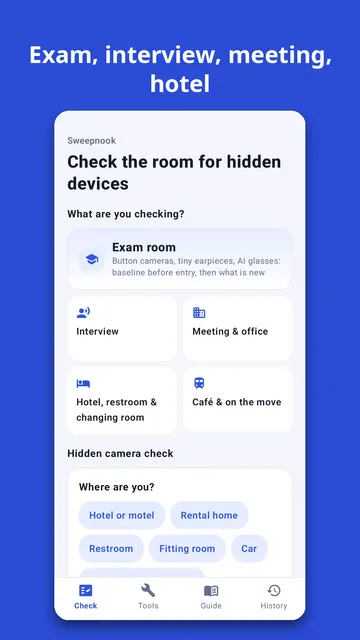
The exam room mode in Sweepnook 2.0 follows these steps. Save a baseline in the empty room, check again during the exam, and it shows only the signals that appeared since. Each one gets a likely kind from public Bluetooth data (smart glasses, earbuds and earpieces, smartwatches, phone hotspots) with the reason, and "walk to find" shows where a signal gets stronger. The proctor checklist keeps the time of each check and you can share the record. It only listens, never connects to or jams anything, and never says a room is "safe".