How to find hidden cameras with your phone: hotel, rental, restroom and changing room
A practical room check for hidden cameras using only your phone: flashlight lens check, infrared check, Wi-Fi device check and where cameras are usually hidden. Plus what a phone cannot find, and what to do if you find one.
Hidden cameras keep turning up in hotel rooms, holiday rentals, public restrooms, changing rooms and even in homes after a repair visit. They are cheap, small and easy to disguise as a charger, a smoke detector or a screw head. You do not need special equipment for a first check. A phone and ten minutes cover most of what a handheld detector does, as long as you know what each method can and cannot find.
1. Look first: where cameras are usually hidden
A camera needs a clear view of the bed, the shower, the toilet or the changing area, and most need power. Start with objects that face those places:
- Bedroom and living room: smoke detectors, wall clocks, USB chargers and adapters, TV boxes, picture frames, lamps, air purifiers and anything plugged into a socket that you would not expect there.
- Bathroom and restroom: air vents, the gap under a partition, toilet paper holders, ceiling panels, hooks and small holes in the wall or door.
- Changing room: mirrors (check whether it is a two-way mirror), clothes hooks, ceiling corners and vents.
- Signs: a tiny hole with a dark dot behind it, a lens that reflects light, a small red or blue LED, a cable going where it should not, or a new screw or sticker that looks out of place.
2. Lens check with the flashlight
Every camera lens reflects light straight back. Turn off the room lights, hold your phone's flashlight next to your eye and slowly sweep the room. A camera lens shows up as a small, sharp glint that stays bright as you move a little. Glass and metal also reflect, so go closer to anything that glints. Some apps make this easier by flashing the light on and off and comparing frames.
3. Infrared check with the phone camera
Cameras that see in the dark use infrared LEDs that are invisible to your eyes but often visible to a phone camera. In a dark room, open the camera and look at suspicious objects. Infrared LEDs appear as purple or white dots. Point a TV remote at the camera first: if you see its LED flash on screen, your phone can see infrared. Many rear cameras filter infrared, so the front camera often works better.
4. Wi-Fi check: which devices are on this network
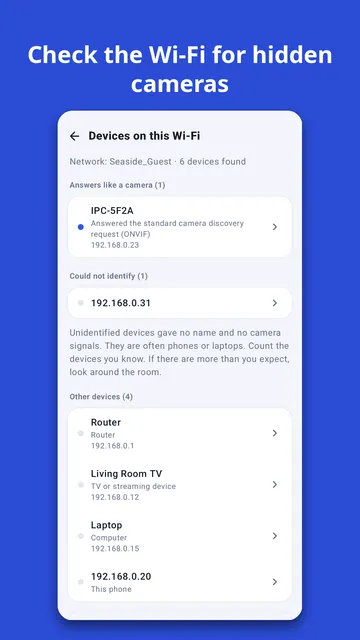
Cameras that stream video to a phone need Wi-Fi. If you are connected to the hotel or rental Wi-Fi, a network scan can list the devices on it. Some cameras answer standard camera requests (for example ONVIF or RTSP) and reveal themselves; others only show an unknown name. A camera on a different, hidden network will not appear. Also look at the list of nearby Wi-Fi names: a strong network with a random or camera-like name inside a small room is worth a closer look.
5. Bluetooth and tracker tags
Some small cameras and recorders, and location tracker tags, send Bluetooth signals. A Bluetooth scan that shows an unknown device getting stronger as you approach a spot tells you where to look.
What a phone cannot find
- A camera that only records to a memory card and sends nothing over the air.
- A camera that is switched off, or connected to a mobile network or a separate Wi-Fi network you are not on.
- A camera without infrared LEDs, when the lens is very well hidden.
A phone's magnetic sensor reacts to any metal or electronics, so a magnetic reading alone does not mean there is a camera. Be wary of any app or gadget that promises it can say a room is "safe". A careful look plus two or three of the checks above is the honest standard.
If you find a camera
- Do not unplug, open or throw it away. It is evidence.
- Take photos of it and of where it is, then leave the room.
- Contact the local police, and the hotel, landlord or booking platform. In many countries hidden recording in a private space is a crime.
- If you think images of you were shared online, contact the police and your country's support service for online sexual abuse victims.
Doing the checks in one app
Sweepnook walks you through these checks in order: a room checklist for hotels, rentals, restrooms, changing rooms and cars, the flashlight lens check, the infrared check, a Wi-Fi device check that shows which devices answered as cameras, and a Bluetooth scan for spy cameras and tracker tags. For each method the app says what it can and cannot find, and it never declares a room "safe". It only listens and asks; it does not log in to, open or record from any device.