Sweepnook for exam organizers, schools and recruiters: one-page overview
How exam boards, universities, academies and recruitment agencies can use a free Android app to give invigilators a wireless-device check: setup, a typical exam day, privacy and limits.
Smart glasses, tiny earpieces and hidden phones have made exam security a wireless problem. Sweepnook gives each invigilator a simple, consistent way to check a room for Bluetooth and Wi-Fi devices that appeared after the room was cleared. It is free on Google Play and needs no account or setup on your side.
Who it is for
- Exam boards and test centres running paper or computer-based exams
- Universities, schools and academies (midterms, finals, entrance tests)
- Recruiters and HR teams running written tests and in-person interviews
- Certification and licensing bodies
A typical exam day
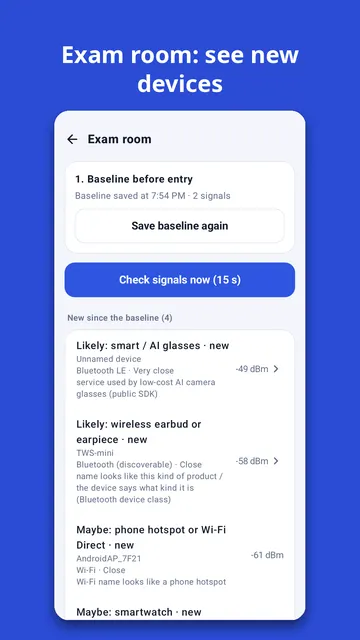
- Before entry (about 1 minute): in the empty room, open exam room mode and save a baseline of nearby signals.
- At entry: use the built-in checklist (phones, watches, earbuds, glasses frames, ears) and collect devices under your own rules.
- During the exam: scan again. Only signals that are new since the baseline are listed, each with a likely kind (smart glasses, earbuds/earpieces, smartwatch, phone hotspot, recorder), the public data it is based on and a confidence level. "Walk to find" shows where a signal gets stronger.
- After: the checklist keeps the time of each check; share the record with your exam office if needed.
Privacy and conduct
- It only listens to signals that devices broadcast anyway. It never connects to, pairs with, records or jams any device, and does not identify people.
- Scan results stay on the invigilator's phone unless the invigilator shares them.
- A signal is a pointer, not proof. Follow your own exam rules before taking action.
Limits you should brief your staff on
It cannot see devices that are switched off, cameras that only record, wired devices, or induction-loop earpieces that emit no radio of their own. Many devices change their Bluetooth address, so one device can look like several. Use it together with visual checks and metal detectors. It never declares a room "safe".
Requirements and cost
- An Android phone (Android 8.0 or later) with Bluetooth and Wi-Fi. Available in 30+ languages.
- Free, with a small banner ad; an optional subscription removes ads. All features are the same.
- Sweepnook is an independent tool and is not certified by or affiliated with any exam board.
Feedback from exam teams
If your team tries it at a real exam, we would like to hear what worked and what did not, by email via the developer contact on the Google Play page.